Registration and Sign-in
Registration provides recognition! Registering on Quikr is just a one-click work. We will keep you signed in and make your work easier and simpler.
1. How do I register on Quikr ?
Registering on Quikr is now a very simple process. It takes only 1 minutes to register and post your Ads
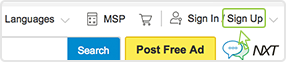
Step 1: Click “Sign Up” tab in the top corner of the website
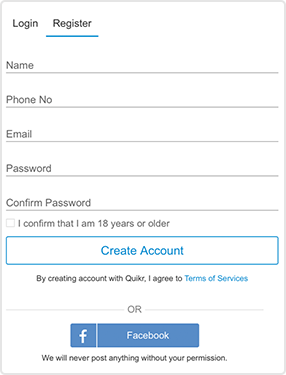
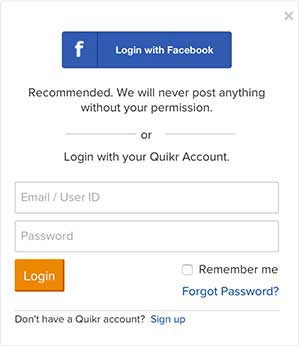
Step 2: Please select your Sign Up option
aYou can directly login using your Facebook credentials as it is a secure, fast and convenient way of authentication.
bYou can enter your details correctly
Email Address
Please enter your correct email address to get all your account and ad related updates in your inbox. Also to get replies and special offers from Quikr.
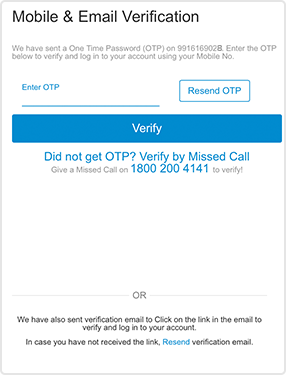
Once you submit the above information, you will be directed to Mobile/Email verification page.
Once the verification is done throught OTP/email link, you become a registered user of the site and can post Ads, manage your Ads and participate in community discussions.
Remember if you get stuck, you could view the Help tips that will automatically appear at every stage during the registration process.
Once registed you can now use your credentials to login to your Quikr Account.
2. Do I need to register to post Ads?
No, you need not be a registered user to Post Ad on the site. But you need to provide your valid email address.
3. What are the benefits of registering on Quikr?
Registration allows to you to
- Post upto 25 Ads a day
- Get your own User Id
- Edit, delete, repost and check replies to your Ads
- Helps you participate in the community discussions
4. How should I Sign In on Quikr?
Sign in allows you to access your account and Ads posted on the site.
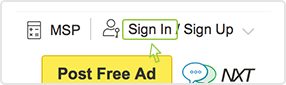
Step 1: Click “Sign In” tab in the top corner of the website
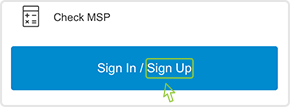
Step 2: If you have a Quikr account, enter your registered mobile number/email address and password to sign into your account.
5. How do I create password for the first time?
You can enter numeric or alphabetical character. To ensure the security of your password, password should be in length of 6-16 characters. Please don’t use your birthday or simple numbers like 123456 or abcdef as password. Please change your password after a certain period. You can change your password in My Account > Change My Password.
6. I forgot my password. How do I get a new one?
You can reclaim your password if you have forgotten it. Registered user’s who haven’t signed in for 90 days should reclaim their passwords and reset their new password in My Quikr.
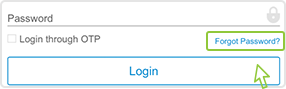
Step 1: Click “Forgot your password?” link on the Sign In panel and it will display a page to “Create a new Password”.
Step 2: Fill in your registration email address/mobile number to get the password, and click the“Send email” button.
Step 3: It will display a successful message: “Your password has been changed. An email has been sent as confirmation.”
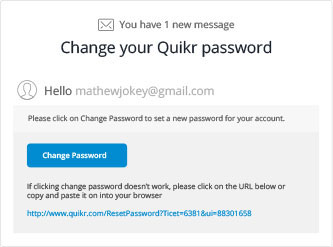
Step 4: In the email you receive, click on the “Change Password” link to set your new password. After which, you can sign in and change your password in “My Account”.
Posting Ads
1. How do I Post an Ad?
Posting an ad on Quikr is very easy and takes not more than 30 seconds. Simply follow the steps below to understand the Post Ad flow better.
Step 1: Click on the Post Free Ad button on the header of all Quikr pages.
Step 2: Select Category & Sub Category
Choose the right category and sub-category as given below to match the product or service you wish to sell or promote. For eg. If you are selling a car, then you should post your Ad in the category Cars & Bikes and Sub category Cars/ Suvs vans.
Step 3: Basic Details Section
- Specify whether you are interested in selling a Product or buying.
- You have an option to choose another category if you wish.
- Make sure you fill in all the mandatory fields through the form.
The Title should preferably include specifics about your Product. For example, if you’re trying to sell a car, you need to mention the Brand, Model, Year , Mileage, Fuel Type, Locality, etc. This helps your Ad become more noticeable.
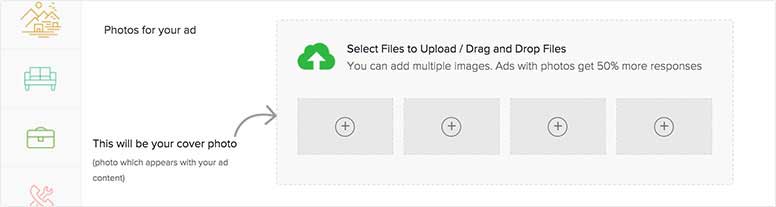
Step 4: Upload Pictures of the product
You have the option of uploading up to 8 pictures of your Product to make the Ad more attractive. The first image will be used as a cover photo wherever the Ad appears across the site. Ads with pictures attract 50% more responses.
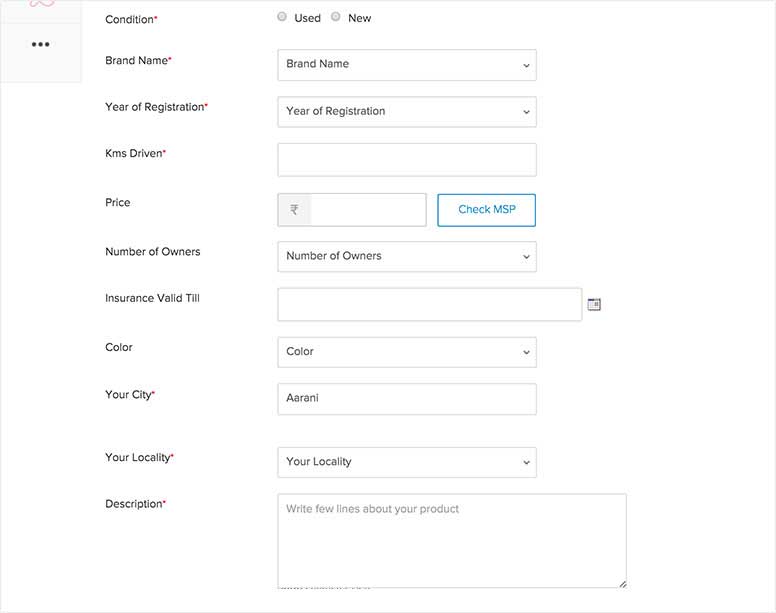
Step 5: Product Details
Give enough information of your item or service to help a potential buyer know more about your item and help your chances of getting quality responses.
Step 6: Seller Information
Enter valid Email Address to:
- Get Id & Password in mailbox
- Post Ads
- Get replies to Ads
- Get buyer alerts and special offers
Adding your Mobile Number is not mandatory. If you choose not to, potential buyers can only contact you via QuikrNXT, our chat facility. Once you feel the need and can trust them enough, you can give your phone number yourself using QuikrNXT.
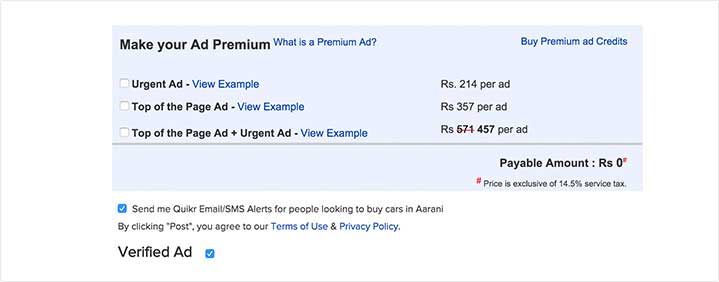
Step 7: Premium Ads
To help your Ad gain more visibility you can always convert it to a Premium Ad by paying a small amount.
Step 8: Click the Post button. Remember, your Ad will be posted only in the city chosen by you while posting that Ad.
2. What do I need to do if my location is not in the list?
If your location is not present on Quikr, you may enter the location closest to you in the list. Mentioning your correct location will help people who see your Ad know where you, your product or service is located.
3. Is it mandatory to enter the mobile number while posting an Ad?
No, mentioning your mobile number is not mandatory. However by entering a valid mobile number you are eligible to receive SMS alerts for your Ad replies. These alerts help you respond faster to potential buyers.
4. What are SMS Alerts?
SMS Alerts help notify the Seller/ Poster of an Ad as soon as he gets a reply. An alert is sent to the Mobile number which you have entered at the time of Posting an Ad or Registration. You will receive SMS alerts for your Ads posted and replies received. You could also choose to de-activate this service using the Update My Profile link under Manage My Account in My Account.
5. How much does it cost to post an Ad on Quikr?
Quikr is a free service and does not charge you any fees to post Ads. Go ahead and enjoy it. All Ads are subject to meeting the Terms of Use and Prohibited Items Policy.
6. How can I post a Good Ad on Quikr and get better responses?
To increase the chance of getting a good response, follow these simple tips.
Title - A good title will attract more visitors to your Ad. Mention important keywords in title.
Description - To get people interested, follow these simple tips
- Make the description as detailed as possible
- Make it easy for buyers to pick up the item by mentioning the location of the item and when you would be available
- Add contact information
Upload Images - Include upto 8 pictures to enhance your Ad.
Use these tips and other innovative ideas to make your Ad more attractive and increase your chances of getting replies. In addition you can also subscribe to Quikr Premium Ad.
7. How long do Ads stay after being posted on Quikr?
Ads stay live on the site for 90 days after which they expire automatically and are not displayed as a part of the live ads on site. You will get Ad Expiry reminders before 5 days and before 24 hours of the Ad expiry date. You can extend your Ad duration by reposting your ads after its expiry, from My Account. You can even delete your Ad by logging in.
8. How do I repost, reactivate or extend my Ads on Quikr?
All Ads are live for 90 days on the Quikr site, post which you will get a reminder expiry mail to repost the Ad. The user can repost his expired Ad from either the repost link in the mail or from Expired Ads Management link under the Manage My Ads tab in My Account.
9. Is there any limit on Posting Ads?
You can post up to 25 different Ads daily. Any duplicate ads or the same ad posted more than once will be deleted.
10. Why am I unable to post Ads on the site?
User's who violate Quikr's Terms of Use and Listing Polices, will not be able to post Ads. However, incase you are unable to post an ad for any other reason, please contact us at support@quikr.com and we will get back to you at the earliest.
11. How do I know if someone is interested or has replied to my Ad?
Those interested in your Ad select the Reply button on the View Ad page, fill in the required details like email, name, and message with their contact details and you would receive an email. After you receive the email message, you can choose to respond and give additional information like phone number.
Users also have the option to contact you on phone. You can give your contact details only if you wish to do so in the ad description area of the post ad page. If you put your phone number, the interested parties can directly contact you.
12. How do I participate on the Quikr Discussion Forums?
Discussion Forums on Quikr are meant to be a public platform for the local community to share their experiences, give their opinion and help people on a range of topics that are relevant and helpful to the local community of the city. It's free.
To participate in the Quikr Discussion Forum:
- You need to register on Quikr
- Select the forum you wish to participate in
- Post your comments
- Please do not use the Discussion Forum to Post Ads or Promote anything.
My Account
1. What is "My Account"?
My Account is your personal user account where you can
- View and manage your Ads
- Modify / edit / delete your Ads
- Check replies to your Ads
- Repost your Ads after they expire
- Update your Quikr profile
2. How can I Sign In to "My Account" ?
Sign in allows you to access your account and Ads posted on the site.
Step 1: Click on Sign In / Register on the top right corner of the home page.
Step 2: If you have a Quikr account, enter your registered email address and password to sign into your
account.
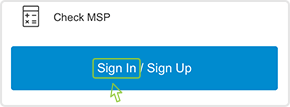
Step 3: If you dont have a quikr account, you can create an account by clicking Sign Up and get registered using your e-mail address or facebook.
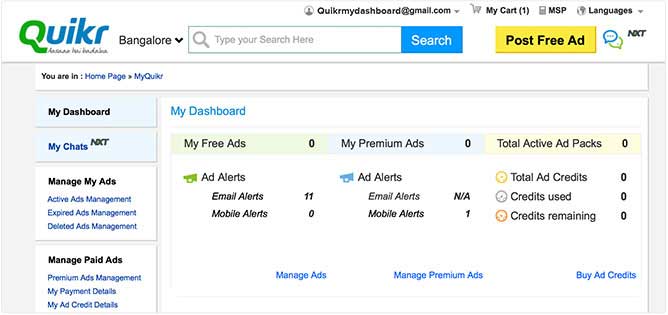
Step 4: After signing in, you will be redirected to My Account page, where you can view, edit, delete and check replies to your Ad.
3. How do I edit, update or delete Ads that I have posted?
Select Manage My Ad >> Active Ads Management on My Account page and click on the respective button in actions for edit, update or delete Ad.
4. How do I upgrade My Ad to Premium Ad?
Select Manage My Ad >> Active Ads Management on My Account page and Click on the Convert to Premium Ad link.
5. What does "Expired Ad Management" mean?
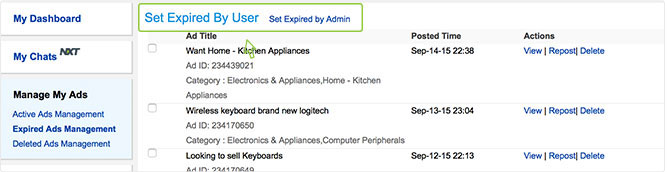
Select Manage My Ad >> Expired Ads Management on My Account Page Expired Ads Management Section contains Ads that are inactive. There are two sub-divisions
- Set Expired by User - Ads which have completed the period of 90 days and not been reposted
- Set Expired by Admin - Ads which have been expired by admin once the product is sold
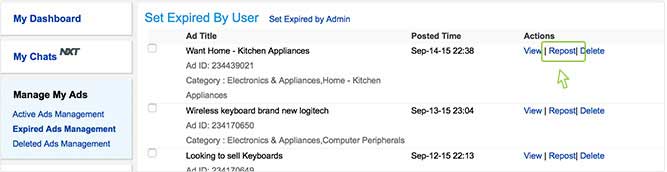
6. How do I repost an expired Ad ?
Select Manage My Ad >> Expired Ads Management on My Account Page. On Expired Ads Management page, Click Repost link
7. What does "Deleted Ad Management" mean?
Deleted Ads Management section contains Ads that are deleted. There are two sub-division.
- User Deleted Ads - Ads deleted by the user itself
- Admin Deleted Ads - Ads that have violated the Quikr listing polices
You will be informed by email when your Ad is deleted by the Admin. If you require any clarification about the deletion of your Ad, don't hesitate to contact the Admin.
Select Manage My Ad >> Deleted Ads Management in My Account Page.
8. How do I edit / update / delete Premium Ads that I have posted?
Select Manage Paid Ads >> Premium Ads Management. On Premium Ads Management page, Click Edit or Delete link for respective actions
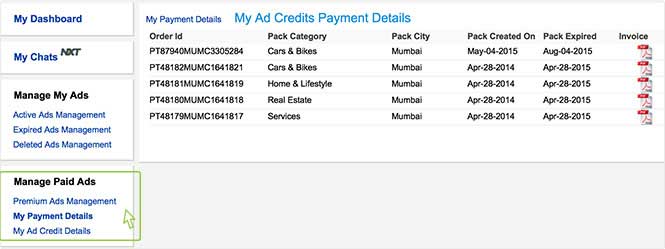
9. How do I check my Payment details?
Select Manage Paid Ads >> My Payment Details on My Account page
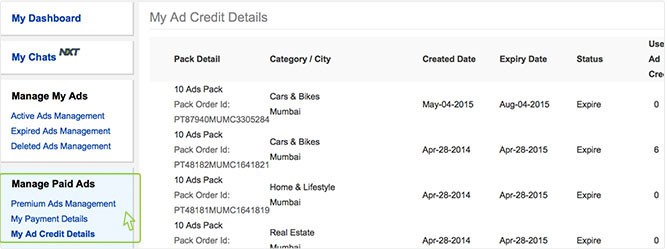
10.What does “My Ad Credit Details” mean ?
It's a secure beneficial pack that lets you pay money for your premium Ads hassle free. Once you purchase the pack, you can post the Ad and money will be deducted from your credit pack. Every time you want to post an Ad, you don't have to deal with cash every time. It saves time and money.
Select Manage Paid Ads >> My Payment Details to know details of payment made.
11. How do I Manage Alerts?
Select Manage Alerts on My Account page
On your My Account Page, the "Manage Alerts" displays two sections
- Email Alerts Management- History of Alerts received through E-mails
- Mobile Alerts Management- History of Alerts received through SMS
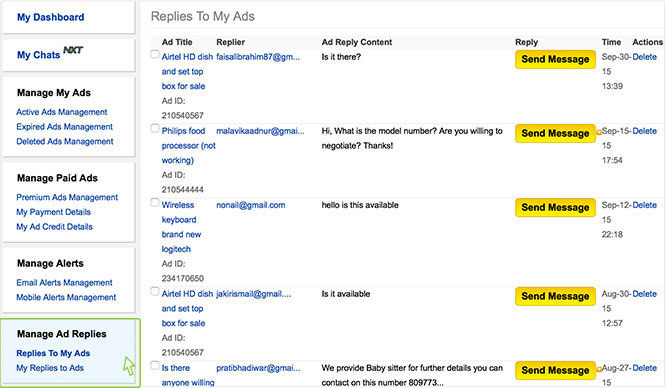
12. What does "Manage Ad Replies" mean?
On your My Account Page, the "Manage Ad Replies " displays two sections
- Replies to My Ads- You can check the replies you have received for your Ad
- My Replies to Ads- You can check the replies you have made to other advertisers Ads
13. How do I update My Account Profile?
As a registered user, you can edit your profile in your My Account account through the Update My Profile section. Please click the Update button after making the changes to store your new details.
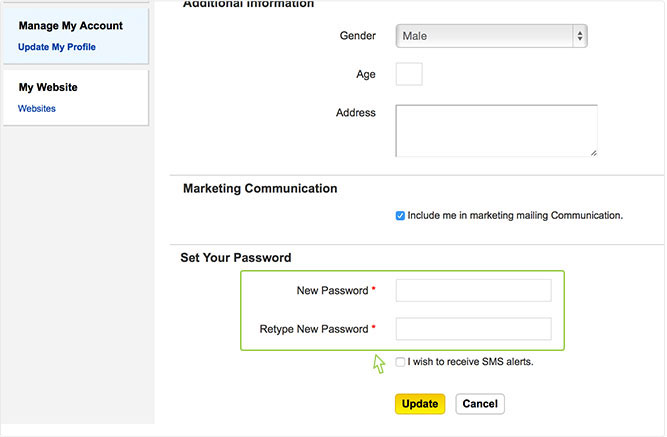
14. How do I change my password?
To change your password, please follow the steps below:
Sign in with your username and password and click on My Account.
Click on Manage My Account >> Update My Profile and reset your password.
Quikr Doorstep
1. What is Quikr Doorstep?
Quikr Doorstep is the easiest way to buy and sell pre-owned goods online. With Doorstep you can negotiate a price, pay for the product and have it picked up and delivered.
2. How do I know if my area is serviceable by Doorstep?
Quikr Doorstep covers over 250+ cities across India and allows you to choose from over 30 categories of products to buy and sell. You can also visit this page to enter your location and confirm if you can avail our service.
3. How can I post an ad?
Look for the Post an Ad button on our app or site and select the category to indicate what type of product you wish to sell. Fill in the details, upload pictures of the product and click POST. Didn’t we tell you it would be easy?
4. I’ve seen something I like, how can I buy it?
Quikr Doorstep allows you to Make an Offer against a product you like. Once this is done, you officially begin a negotiation with the seller who can choose to accept your offer or counter it. If both parties are satisfied, you can proceed to make a payment which is held safely in our escrow account and released only after the product is delivered to you. We encourage you to always check the condition of the product once received.
5. As a seller, how will I know if the buyer has made the payment?
All payments are routed through our escrow account. Once the buyer pays the agreed amount, we will notify you via your registered email id and mobile number. This amount will get credited to your bank account once the product has been delivered to the buyer.
6. How much am I being charged for Doorstep pickup and delivery?
A nominal convenience fee is charged based on the location as well as the product’s weight and dimensions.
7. While trying to sell an item, one of the offers was Auto-accepted. Why did this happen?
Any offer that is above the asking price is auto-accepted by the system. In case you would like to change the asking price you may go back and edit the original ad.
8. How long does it take for a product to get delivered after a transaction has been made?
Lighter items can be shipped throughout India while medium and heavy products can be shipped only within the seller’s city. Intercity deliveries are fulfilled within 5-7 working days while deliveries within the same city happen between 2-3 working days.
9. Is it possible to track the status of the shipment while in transit?
Shipments are made as per scheduled slots, however, you can also track your order status via the app and site.
10.Can I pick-up the product myself?
Absolutely! You can pay for your purchase online but opt to pick-up the product yourself.
11. How can I delete my Ad once the transaction has taken place?
Once your product has been sold you can delete the ad to ensure that you do not get any further queries from buyers. To do this, log in to Quikr account, select Manage My Ads and under active Ads, select the Ad that you would like to delete and finally click on the Trash Can icon to delete the ad.